Available now
Shopify app by Fixpoint One
FP1 - Hide Payment Methods
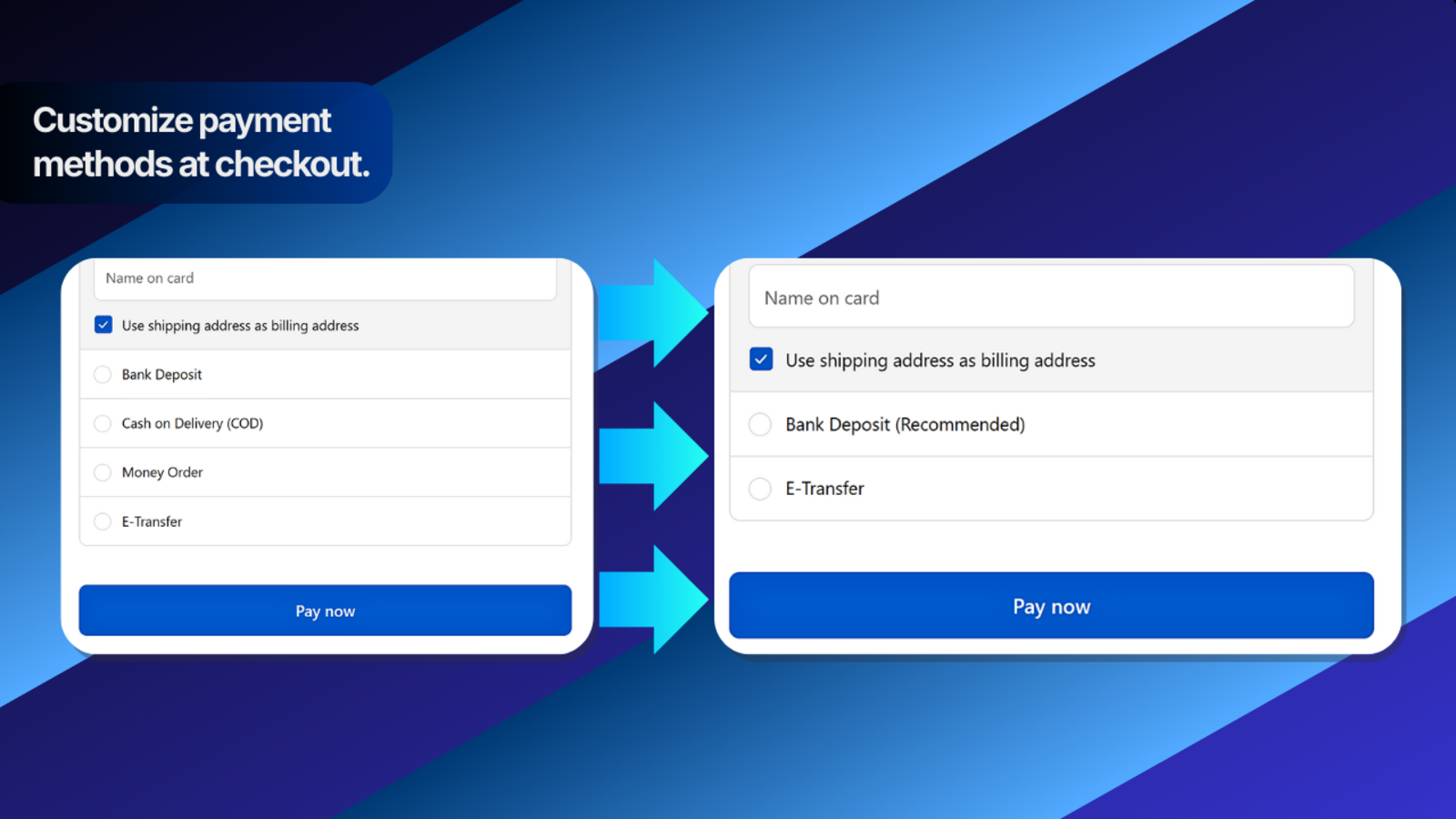
Hide or rename eligible payment methods, or put one preferred payment method first at checkout. Apply each rule always, by shipping country, or by order value.
Best for: Stores that want simple payment-method rules based on shipping country or order value.
Not for: Adding payment providers or bypassing Shopify checkout limits.
1 active payment rule freeno time limit • Unlimited $4.99 USD every 30 days • billing starts only if you choose Upgrade to Unlimited in the app
- Direct support
- Clear setup guide
Admin-onlyNo theme edits or scripts
Simple rulesOne action, method, condition
Country rulesOnly in or everywhere except
Order valueAt least or at most
How it works
Create straightforward payment rules for checkout.
Choose one action, one payment method, and one condition for each rule.
What it does
- Hide one payment method when a rule matches.
- Rename one supported payment method when a rule matches.
- Put one preferred payment method first when a rule matches.
- Apply rules always, by shipping country, or by order value.
- Enable or disable saved rules in Shopify Admin with no theme edits.
How it works
- Create a rule with one action, one payment method, and one condition.
- Choose Always, Shipping country, or Order value.
- Shipping-country rules can apply only in the selected country or everywhere except it.
- Order-value rules can apply at least or at most the amount you enter.
- Multiple enabled rules can work together at checkout when they match.
Available conditions
- Always
- Shipping country
- Order value
Payment method targeting
- Choose a common payment method or enter the name Shopify shows at checkout.
- Use the checkout name when testing rules for methods such as
PayPal, E-Transfer, or Bank Deposit.
Shopify limitations
- The app cannot add payment providers or make a method eligible when Shopify does not offer it.
- Shopify may limit customization of some card and express checkout methods depending on store plan and region.
- Shopify currently lists Payment Customization Functions as unsupported for recurring subscription orders; pre-order and Try Before You Buy are supported.
- Unsupported changes are skipped safely instead of breaking checkout.
Questions before installing
Frequently asked questions
Can this app add new payment methods?
No. It controls eligible payment methods that Shopify already provides at checkout. It cannot add a payment provider or bypass Shopify eligibility rules.
Can multiple enabled rules work at the same checkout?
Yes. Each enabled rule is evaluated independently, so multiple matching rules can affect the same checkout. Each rule contains one action, one payment method, and one condition.
Why did a rename or Put-first rule not apply?
Shopify may limit customization of some card and express checkout methods depending on store plan and region. Unsupported changes are skipped safely.
What conditions can I use?
A rule can apply Always, by Shipping country, or by Order value. Shipping-country rules can apply only in the selected country or everywhere except it. Order-value rules can use at least or at most.
Does HPM work with subscriptions, pre-orders, or Try Before You Buy?
Shopify currently lists Payment Customization Functions as unsupported for recurring subscription orders. Pre-order and Try Before You Buy are supported by Shopify's Payment Customization Function API. Because HPM uses that API, HPM rules do not apply to recurring subscription orders.
How does billing work?
Free includes 1 active payment rule with no time limit and no billing approval. Choose Upgrade to Unlimited in the app for $4.99 USD every 30 days when you need unlimited active rules. If you later choose Cancel Unlimited, future billing stops. Unlimited remains active until the end of your current paid billing period, then your plan returns to Free. There is no partial refund for unused time in the current paid period. If more than one rule is active, choose the rule that should remain active on Free; extra saved rules stay saved but inactive after the paid period ends.
1 active payment rule free
Start free and upgrade only when you need more active rules.
Free includes one active payment rule with no time limit and no billing approval. Upgrade in Shopify only when you need Unlimited active rules for $4.99 USD every 30 days.